codn — A Native Linux App for Terminal Coding Agents

Update, October 17, 2026: codn is public since October 15, version 0.3.0, at github.com/hoffmannroman/codn, and its page is codn.dev. It shows no logo of another maker any more: Claude Code and Codex both have a neutral icon. What follows describes October 10.
The codn mark: the construction on the left, the result on the right.
Everything I tried for running coding agents felt overloaded. So I am building my own.
codn is a native Linux app in Rust. It runs your agents’ real command line programs, Claude Code, Codex or a plain shell, in terminals, and puts a sidebar next to them that tells you which one is waiting for you. It shares its name with this blog.
In March I wrote that agentic coding started a terminal renaissance. I still think the terminal is the right interface for agents. But a terminal alone does not tell you which session needs you, what changed in the project, or how full a context is. codn adds those things around the terminal, and nothing else.
It is not released yet. This post describes codn as I use it on October 10, 2026. Every screenshot says which version it shows.
Table of Contents
- What codn Is
- The Real CLIs, No API Key
- Which Session Needs You
- Starting and Continuing Sessions
- A Bar That Follows the Session
- Subagents as Rows
- Changes and Files Beside the Session
- Two Sessions Side by Side
- One Process, One Window, One Draw Call
- The Mark
- Not There Yet
- Current Status
- Frequently Asked Questions
What codn Is
Projects on the left, and inside each project the sessions you run there. Beside a session, the changes of the project or one of its files. Along the bottom, a bar with the model, the context and the limits.
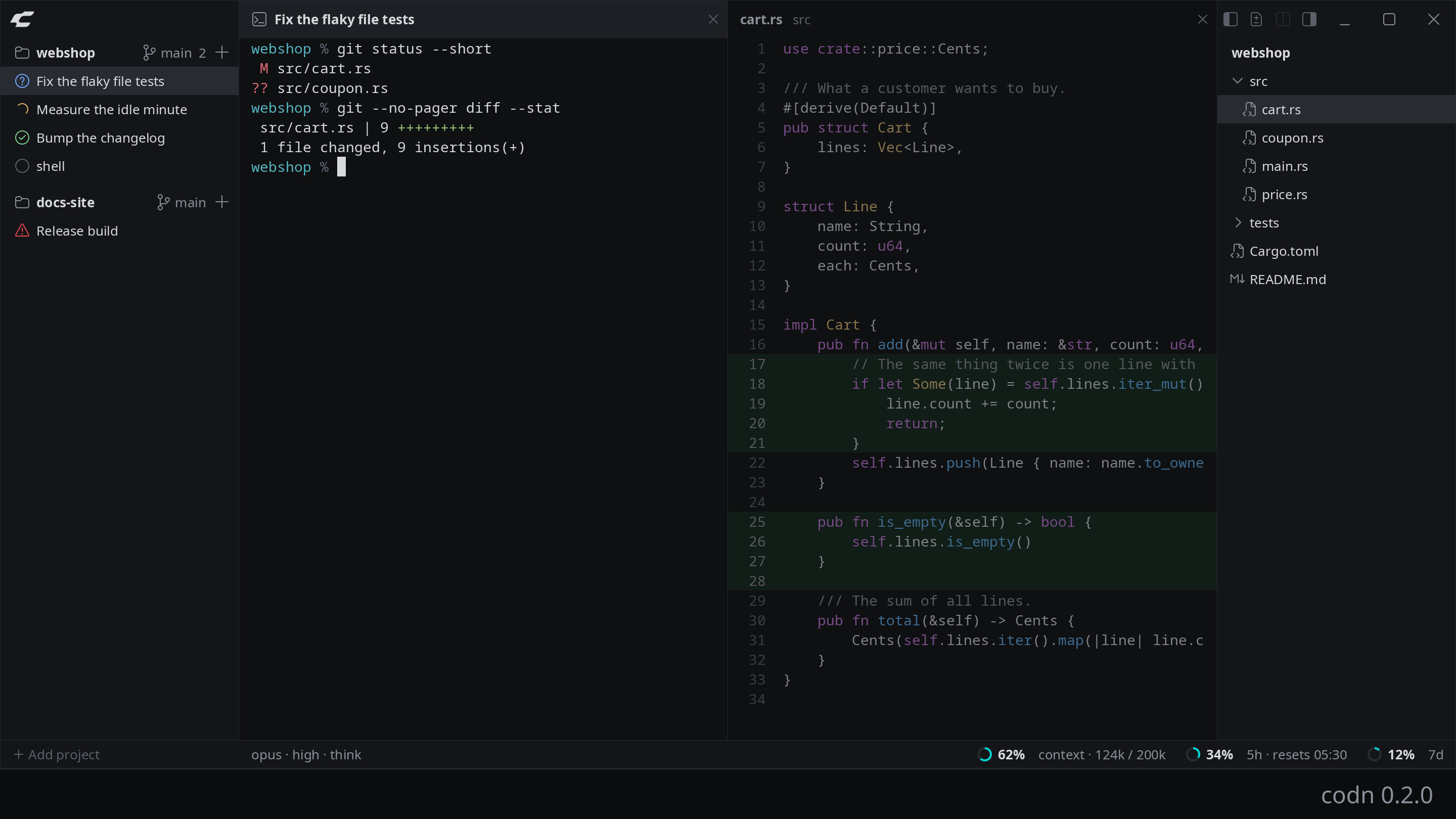
codn 0.2.0. Two projects, five sessions, a file beside the session in front, the files of the project at the right. Click a screenshot for its full size.
That is the whole interface. There is no chat view of its own and no account. The configuration is one optional TOML file.
A note on the screenshots: every session in them is a shell that reports its state and its figures itself, as any program can.
The Real CLIs, No API Key
A session is the agent’s own command line program running in a terminal. codn does not talk to any model API and never sees a token. You log in to claude or codex the way you always do, and your subscription works as it does in any other terminal.
Everything else follows from this decision. codn does not render a conversation of its own, so there is nothing to keep in step with what the agents draw. What you see is the program you already know.
Claude Code, Codex and a plain shell are built in. Any other CLI is a few lines of configuration:
[[agent]]
name = "other"
cmd = "my-agent"
icon = "robot"
shift_enter = true   # Shift+Enter inserts a line break
The terminal emulator is not mine either. alacritty_terminal does the parsing and the state, and only one module of codn knows it.
Which Session Needs You
This is the reason codn exists. With several agents running, the question is never “what is on this screen”. It is “which of them is waiting for me”.
Every session has a mark in front of its name, and every state has a shape of its own:
- A gray ring at rest
- A yellow arc that turns while it works
- A blue question mark while it waits for you
- A green check when it is done, until you have looked at it
- A red triangle when it failed or is not running
- A blue dot when it stopped while you were not looking and did not say why
The shapes tell the states apart without the colors.
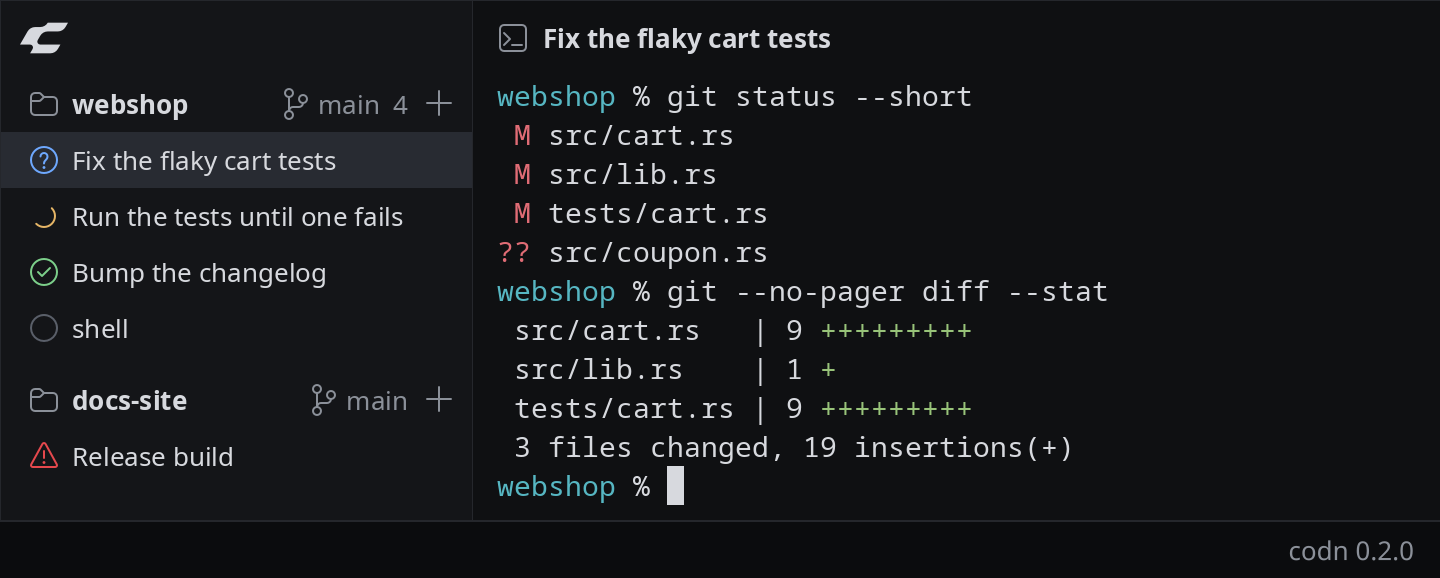
codn 0.2.0. Waiting for you, working, done, at rest, failed.
The state comes from two places. The ring, the arc and the blue dot are derived from terminal activity, so they work for any program without setup.
A program can also report its own state, with the program status protocol (OSC 7501), and is then believed over its output. Claude Code speaks it from 2.1.295 on, to a terminal that answers its question, which codn does. That is where the question mark and the check come from, and the triangle when a program says it failed. The triangle also shows when the program is not running at all: it could not be started, or it ended with an error.
Any program can do the same. This line turns a shell session into one that waits for you:
printf '\033]7501;state=blocked:kind=question\033\\'When a session you are not looking at needs you, a desktop notification says so, and what for: a permission, a question, a login, done or failed.
Starting and Continuing Sessions
The plus beside a project, or Ctrl+Shift+E, opens a list of the agents. The one you used last in this project comes first, and Enter starts it.
The arrow at the right of an agent shows what can be set before the start. For Claude Code that is the model, the effort and the permission mode, for Codex the model, the reasoning effort and the sandbox. What you set is remembered per project and agent.
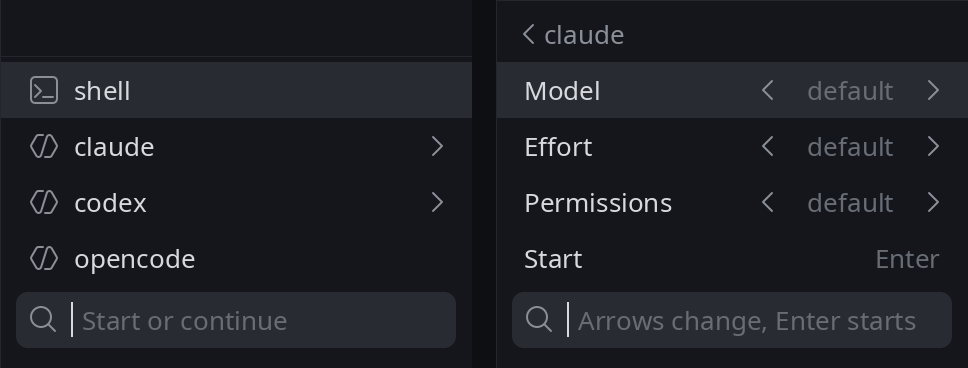
codn 0.3.1. The list that starts a session, and what can be set before the start.
Below the agents, the same list shows the earlier conversations they have on disk for this folder, most recent first. It finds them where the agents keep them, whether they were started in codn or not. Type to filter, Enter continues one.
After a restart of codn the sessions are back, and each one is started again when you first open it. Claude Code continues its conversation, and so does a Codex conversation that was continued from that list. A new Codex session starts fresh, because Codex exposes no id of the conversation it is in, and codn does not guess one from files that another process might have created.
A Bar That Follows the Session
Along the bottom runs a bar with what the program of the session in front reports about itself: the model and what it runs with, and one ring for the context and one for each limit, filled as far as it is used.
Nothing is scraped from the terminal. codn hands every program it starts the path of a file, in the variable CODN_STATUS. Whatever writes these keys there, as TOML, is shown:
model = "opus"
options = ["high", "think"]
tokens = 124000      # in the context now
window = 200000      # what the context holds

[limits.5h]
used = 34            # percent
resets = 1791315360  # seconds since 1970

[limits.7d]
used = 12.5
Claude Code writes that file through a plugin that comes with codn and that you load into Claude Code yourself, Codex through a small Python script that Codex runs when a turn has ended. A line of shell works as well as an agent:
printf 'model = "build"\n' > "$CODN_STATUS"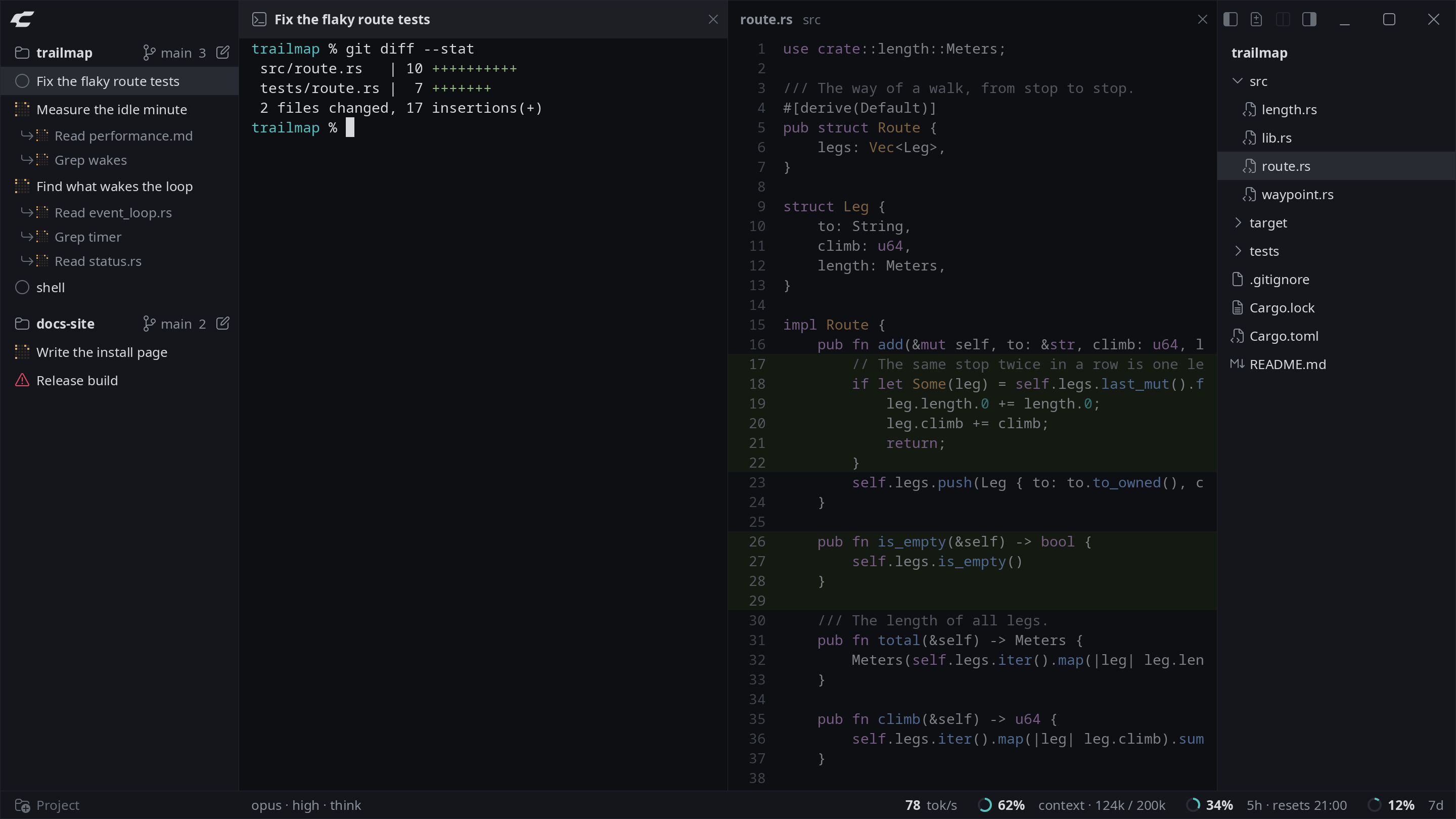
codn 0.3.1. A session that writes its figures into the file, as the plugin of Claude Code does, and in the bar what it reported.
Every session reports into a file of its own, so the bar follows the session in front and nothing gets mixed up. The file is read again while the session is active. A new context window shows with the next response.
One caveat: the plugin is written against an API of Claude Code that is in early access and may change from one release to the next.
Subagents as Rows
This one is built but not yet in a numbered version.
The agents a Claude Code session sends off are rows below it in the sidebar. Each has the mark of its state and its last step, which is the tool it called last: Read sidebar.rs, Grep OpenBelow. A row disappears when its agent has ended. A click on one opens the session it belongs to.
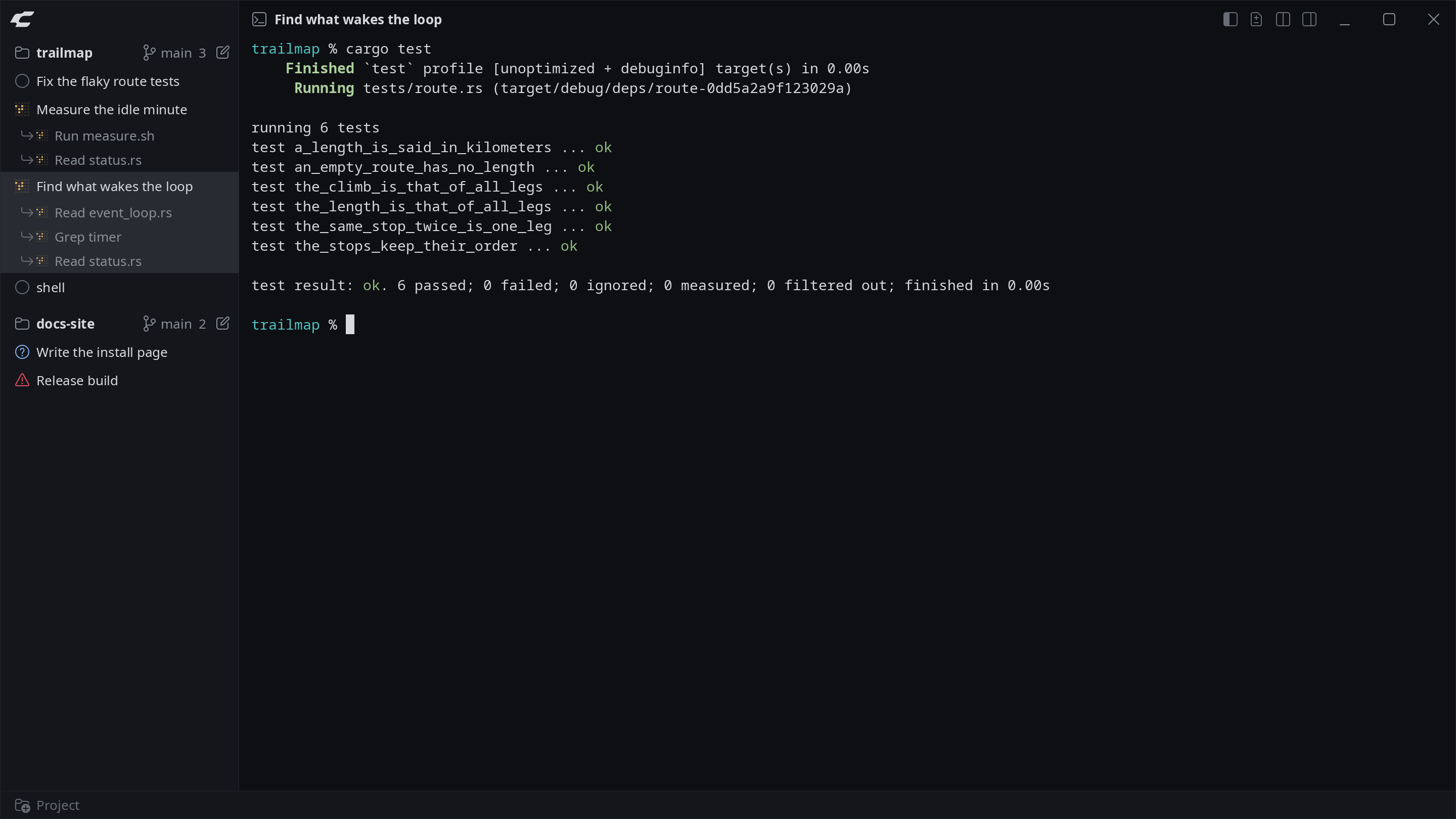
codn 0.3.1. A session that reports three agents, as Claude Code does through its plugin, and what each of them is doing.
The plugin hands codn that step. The command an agent runs is never written, only the words Claude writes of it.
Only Claude Code has such rows. Codex tells a terminal nothing about its agents. The rows show what an agent is doing. They do not take you into the view of one agent.
Changes and Files Beside the Session
An agent changes files. So the two things I want beside a session are what changed, and the file itself.
A click on the branch name of a project, or Ctrl+Shift+D, shows everything that changed since the last commit, including new files.
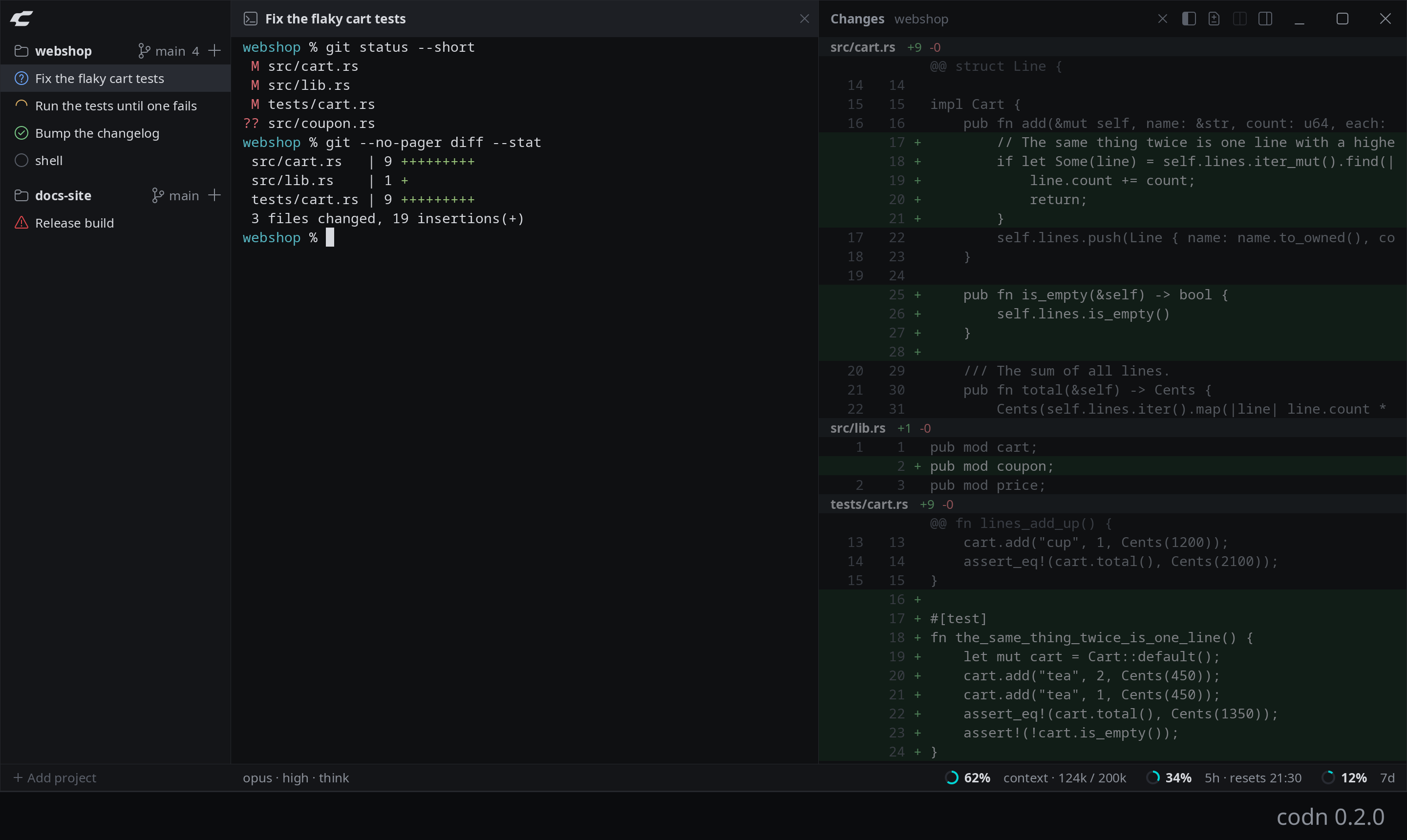
codn 0.2.0. The changes of a project beside the session that made them.
Ctrl+Shift+F shows the files of the project in a column at the right. A click on a file shows it where the changes are shown, in the colors of its language, for nineteen languages. Lines that are new or changed since the last commit have a green surface. Where lines were removed, the number of the line that follows is red.
You can type into the file, and Ctrl+S saves. That is there to read what an agent wrote and to change a line of it without another program. It is not an editor that wants to replace yours: there is no find in a file yet.
One detail matters with agents around. A file that another program wrote to while you had changes in it is not overwritten. codn says so and lets you choose: take what is on the disk, or write what is in the pane.
Two Sessions Side by Side
Shift+click on a session opens it beside the current one. Ctrl+Shift+Left and Ctrl+Shift+Right switch between the two panes.
Ctrl+Shift+B folds the sidebar to a strip. The strip keeps the mark of every session, so a session that waits for you is still visible.
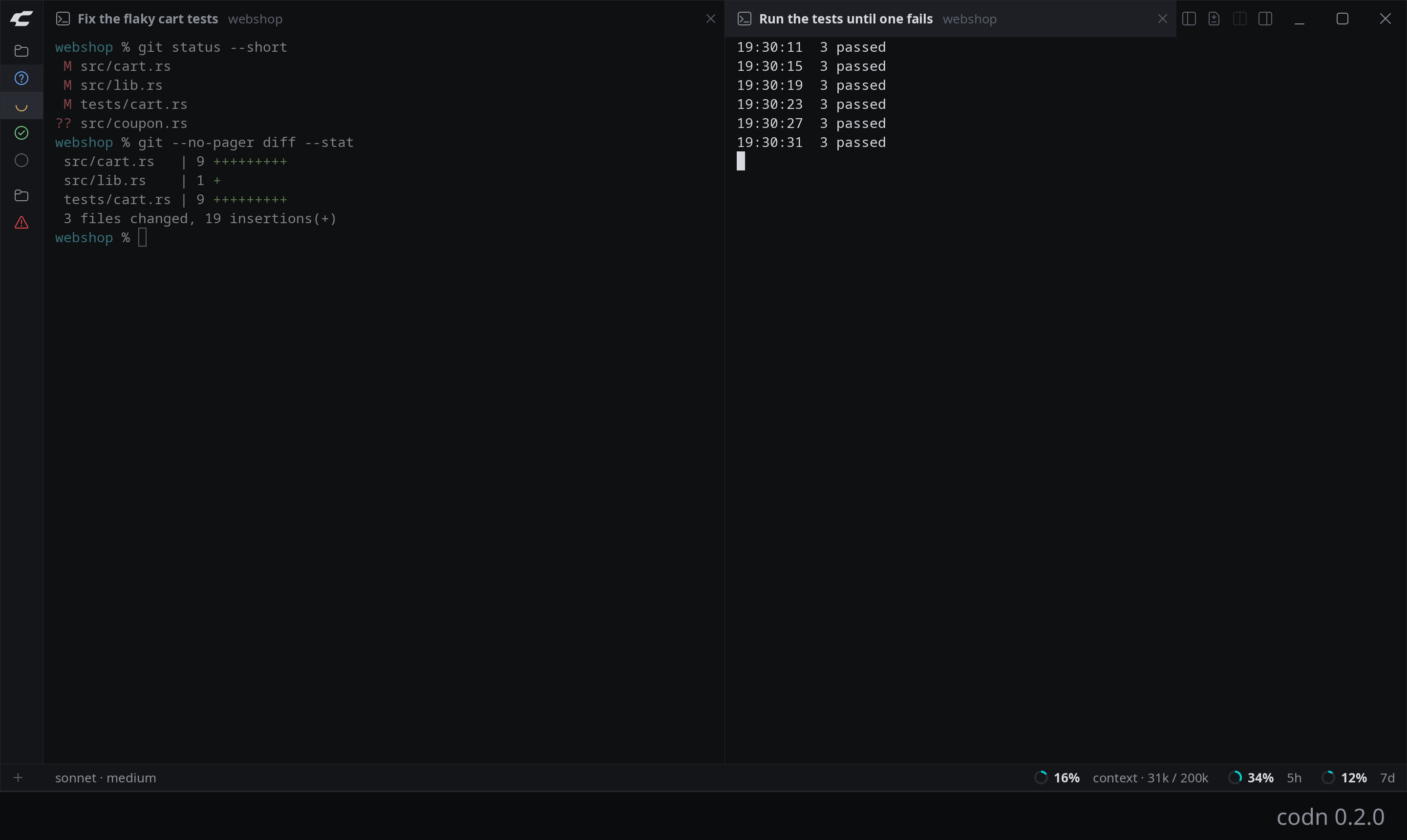
codn 0.2.0. Two sessions side by side, the sidebar folded to a strip.
One Process, One Window, One Draw Call
codn is small on purpose.
- Everything on screen is a quad. Rectangles, glyphs from an atlas, box-drawing characters as geometry. One draw call per frame.
- Drawn only when something changed. An idle window sleeps until a key or output arrives.
- Few dependencies. The binary links against libc, libm and libgcc. Window and GL libraries are loaded at run time.
Measured with the release build on an i7-12700K with a GTX 980, a graphics card from 2014, under Wayland:
| What | Measured |
|---|---|
| First frame, from the start of the process | 30 ms, 37 ms on a Plasma desktop |
| A key answered by a frame, median | 0.6 ms |
| System calls of an idle window in a minute | none |
| Memory of its own after the start | 15 MiB |
| One session with a full scrollback of 10,000 lines | 28 MiB more |
The 0.6 ms run from the key reaching codn to the frame being handed to the compositor. They are not from the keyboard to the screen.
The resident set is about 100 MB, most of it GPU driver libraries shared with other programs. The release binary is about 7 MB.
The Mark
The logo at the top of this post is built, not drawn.
It is a C of two bands that meet in one point. It sits on a grid of equilateral triangles: lines run level or at 60 degrees, every corner of the outline is a node of the grid, and every large arc has the width of the band as its radius. Corners are sharp outside and round inside.
A Python script builds the outline from a list of 12 nodes and writes every file: the mark, the application icon, and the construction drawing on the left of the picture. To change the shape, I change the list.
The first version was four capsules of equal thickness. They read as the links of a chain and not as a C, so it went.
Not There Yet
codn is usable, and it is not finished. Missing today:
- Themes and a light mode
- Clickable links, and search in the scrollback
- Reordering of projects and sessions
- A worktree per session
- Projects on another machine
- Packages, and any system but Linux
It is also not a structured view of an agent’s conversation. You see what the CLI draws, in a terminal.
Current Status
This post describes codn on October 10, 2026. Version 0.2.0 is built and used every day by me, on Arch Linux with KDE Plasma (Wayland, NVIDIA), and tested on plain X11.
It is not released. There are no packages and there is no public repository yet.
I post what I learn along the way on X, as @romanhoffmann.
codn is not affiliated with, endorsed by or sponsored by Anthropic, OpenAI or the makers of opencode. Claude and Claude Code are trademarks of Anthropic, and OpenAI and Codex are trademarks of OpenAI. codn names them only to say which program a session runs, and shows no logo of any of them.
Frequently Asked Questions
- Q: Does codn need an API key?
- A: No. codn starts the agent's own command line program in a terminal and never talks to a model API, so it never sees a token. You log in to claude or codex as you always do, and your subscription works as in any other terminal.
- Q: Which coding agents does codn support?
- A: Claude Code, Codex and a plain shell are built in. Any other command line program can be added with a few lines in codn's configuration file: its command, its arguments, and optionally where it keeps its conversations.
- Q: How does codn know what a session is doing?
- A: In two ways. From terminal activity, which works for any program without setup: at rest, working, or stopped while you were not looking. And from the program itself, through the program status protocol (OSC 7501), which Claude Code speaks from version 2.1.295 on: working, waiting for you, done or failed. What a program reports is believed over what it prints.
- Q: Does codn run on macOS or Windows?
- A: No. codn runs on Linux only, on Wayland and on X11. Version 0.2.0 is used every day on Arch Linux with KDE Plasma and tested on plain X11.
- Q: Can I download codn?
- A: Not yet. As of October 10, 2026, codn is at version 0.2.0, not released, and has no packages and no public repository.