The Speedport Plus 2: Reverse Engineering an Encrypted API

I have two routers. The Asus DSL-AC87VG is the main gateway — it runs in the ground floor, handles DSL, and manages the primary network. The Speedport Plus 2 sits in the upper floor, connected via Powerline, configured as a pure access point. Between the two, every device in the house is covered.
For my home dashboard Notos, I wanted data from both. Which devices are connected where. Signal strength per client. WiFi standard negotiated. Whether that laptop in the bedroom is limping along on 2.4 GHz or actually using the 5 GHz radio.
The Asus has a CGI-based web interface — old-school, no encryption, reachable with a session cookie and some regex. The Speedport is a different story. Its API is encrypted. Not HTTPS-encrypted (it runs plain HTTP on the local network), but request-body-encrypted. Every query and every response is an AES-CCM ciphertext blob. There is no documentation, no SDK, no community reverse engineering writeup I could find.
So I opened DevTools.
Table of Contents
- What Is the Speedport Plus 2?
- Starting Point: DevTools and Encrypted Blobs
- Finding SJCL in the Router Frontend
- The Five-Step Authentication Flow
- The Encryption: AES-CCM and PBKDF2
- TR-181: The Parameter System
- The Quirks That Cost Me Time
- The Python Implementation
- What You Get
- Lessons Learned
What Is the Speedport Plus 2?
The Speedport Plus 2 is a home gateway produced by Sagemcom, distributed by Cosmote (the Greek telco) as a branded product. The firmware is custom. The web interface is a single-page JavaScript application that lives at http://speedport.ip/ — a local hostname the router advertises on the network, no IP address required. There is no publicly documented API.
What made this interesting: the device is clearly not running some ad-hoc home-brew protocol. The API follows TR-181 — the Broadband Forum’s data model for home gateways, widely used in DSL and cable equipment. The encryption is SJCL — the Stanford JavaScript Crypto Library, an open-source cryptographic toolkit that runs in browsers. Both are well-documented standards. Only the specific combination — how SJCL is used, what hash constants appear in the auth flow, what the exact parameter paths are — required excavation.
Starting Point: DevTools and Encrypted Blobs
Open the router’s web UI. Open the Network tab. Log in.
You see the standard auth requests: GET /login.html, GET /data/user_lang.json, POST /data/login.json. Readable, unsurprising. Then you navigate to the device list. The browser makes a POST to /data/data.cgi. The request body looks like this:
{"iv":"abc123...","v":1,"iter":1000,"ks":128,"ts":64,"mode":"ccm","adata":"","cipher":"aes","salt":"xyz...","ct":"...long base64 blob..."}The response is the same format. Encrypted in, encrypted out.
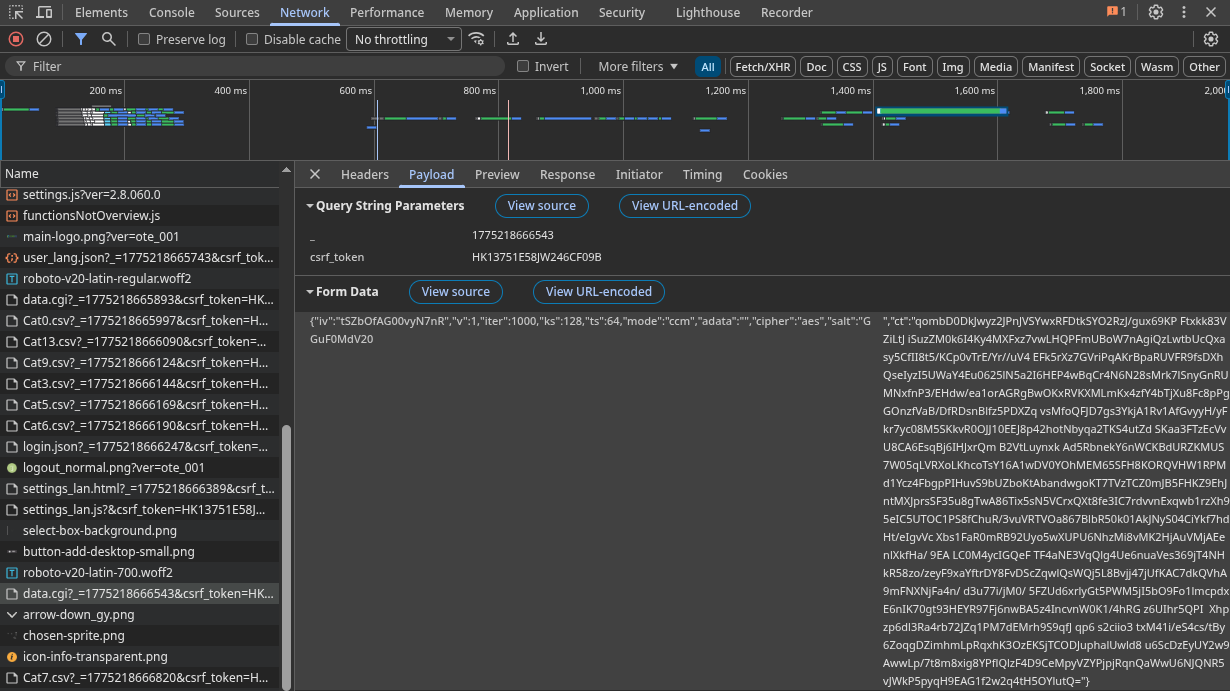
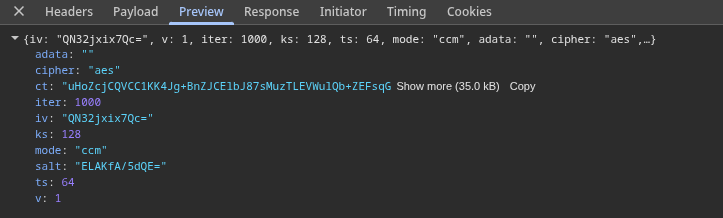
The keys in that JSON structure — iv, iter, ks, ts, mode, cipher, salt, ct — are not guessable, but they are also not random. That structure has a name.
Open the Sources tab. Search the loaded JavaScript for "ccm".
Finding SJCL in the Router Frontend
The router’s frontend bundles the Stanford JavaScript Crypto Library (SJCL). It is not minified beyond recognition — you can read the source. The relevant call the router’s own JavaScript makes looks like this:
sjcl.encrypt(password, JSON.stringify(payload), {
  iter: 1000,
  iv: sjcl.random.randomWords(3, 0)
})
SJCL is a well-documented library. Once you have identified it, the JSON structure makes sense:
| Field | Meaning |
|---|---|
iv | 12-byte (3×32-bit words) initialization vector, base64 |
iter | PBKDF2 iterations (1000) |
ks | Key size in bits (128 = AES-128) |
ts | Authentication tag size in bits (64) |
mode | Cipher mode (ccm = AES-CCM) |
salt | 8-byte PBKDF2 salt, base64 |
ct | Ciphertext + authentication tag, base64 |
SJCL derives an AES key from a password string using PBKDF2-SHA256. The question is: what is the password? The answer requires understanding the authentication flow.
The Five-Step Authentication Flow
The login sequence is more elaborate than a typical router. It involves five requests, two cryptographic key derivations, and one hardcoded constant that only appears in the router’s JavaScript source.
Step 1 — CSRF Token
GET /login.htmlThe response contains a JavaScript variable in the HTML:
var csrf_token = 'a1b2c3d4e5f6...';Every subsequent request includes this token as a query parameter. Standard CSRF protection, straightforward to extract with a regex.
Step 2 — Encryption Key and Salt
GET /data/user_lang.json?_=1743600000000&csrf_token=a1b2c3d4...This endpoint returns a JSON array. Buried in it are two fields:
[
  {"varid": "encryption_key", "varvalue": "abc123def456..."},
  {"varid": "salt", "varvalue": "deadbeef01020304"}
]
The encryption_key is a server-side random value. The salt is a hex-encoded byte sequence used for PBKDF2. The router hands these to you in plaintext — they are not secrets, because neither is sufficient to authenticate on its own.
Step 3 — Login Hash
The authentication hash requires three inputs: your password, the encryption_key from Step 2, and a hardcoded constant that only appears in the router’s frontend JavaScript source: $1$SERCOMM$.
pass_sha256 = hashlib.sha256(password.encode()).hexdigest()
hash1 = hmac.new(b'$1$SERCOMM$', pass_sha256.encode(), hashlib.sha256).hexdigest()
login_hash = hmac.new(enc_key.encode(), hash1.encode(), hashlib.sha256).hexdigest()
The hardcoded HMAC secret $1$SERCOMM$ is a Sercomm/Sagemcom firmware constant. It appears verbatim in the router’s bundled JavaScript. Finding it is a matter of searching the loaded scripts for SERCOMM in the DevTools Sources tab. This constant — or a close variant — appears across multiple Sagemcom and Sercomm firmware lines. If you have a different ISP-branded Sercomm device, that search is the right first step.
Step 4 — Encryption Key Derivation
The password for SJCL encryption is not your router password. It is a 16-byte key derived with PBKDF2-SHA256 from the SHA-256 of your password and the salt from Step 2:
dk = hashlib.pbkdf2_hmac(
    'sha256',
    pass_sha256.encode(),
    bytes.fromhex(salt_hex),
    1000,
    dklen=16,
)
dk_hex = dk.hex()  # this is what sjcl_encrypt/sjcl_decrypt use as "password"
This derived key is what all subsequent data queries use for encryption.
Step 5 — Login
POST /data/login.json?_=1743600000000&csrf_token=...
Content-Type: application/x-www-form-urlencoded

LoginName=admin&LoginPWD={login_hash}
A successful login returns the JSON string "1". That is it. No token, no cookie beyond the session cookie the browser already has. The CSRF token and the derived key are all you need to query data.
The Encryption: AES-CCM and PBKDF2
With the derived key in hand, every query to /data/data.cgi follows the same pattern: encrypt the JSON-RPC payload, POST the encrypted blob, decrypt the response.
The encryption is AES-CCM (Counter with CBC-MAC) — an authenticated encryption mode that combines confidentiality and integrity. The authentication tag is 64 bits (8 bytes). The key is 128 bits (16 bytes). The IV is 96 bits (12 bytes), freshly randomized per request.
The Python cryptography library’s AESCCM class handles this directly:
from cryptography.hazmat.primitives.ciphers.aead import AESCCM

def sjcl_encrypt(dk_hex: str, plaintext: str) -> str:
    salt = os.urandom(8)
    iv = os.urandom(12)

    key = hashlib.pbkdf2_hmac('sha256', dk_hex.encode(), salt, 1000, dklen=16)

    aesccm = AESCCM(key, tag_length=8)
    ct_and_tag = aesccm.encrypt(iv, plaintext.encode(), b'')

    return json.dumps({
        'iv': base64.b64encode(iv).decode(),
        'v': 1, 'iter': 1000, 'ks': 128, 'ts': 64,
        'mode': 'ccm', 'adata': '', 'cipher': 'aes',
        'salt': base64.b64encode(salt).decode(),
        'ct': base64.b64encode(ct_and_tag).decode(),
    }, separators=(',', ':'))
Notice the separators=(',', ':') argument on the final json.dumps. That is not stylistic. It is required.
Decryption is the exact inverse — extract the parameters from the SJCL JSON, re-derive the key with the same PBKDF2 call, and pass everything to AESCCM.decrypt:
def sjcl_decrypt(dk_hex: str, ciphertext_json: str) -> str:
    data = json.loads(ciphertext_json)

    salt = base64.b64decode(data['salt'])
    iv = base64.b64decode(data['iv'])
    ct_and_tag = base64.b64decode(data['ct'])
    iterations = data.get('iter', 1000)
    key_size = data.get('ks', 128) // 8   # bits to bytes
    tag_size = data.get('ts', 64) // 8    # bits to bytes

    key = hashlib.pbkdf2_hmac('sha256', dk_hex.encode(), salt, iterations, dklen=key_size)

    aesccm = AESCCM(key, tag_length=tag_size)
    return aesccm.decrypt(iv, ct_and_tag, b'').decode('utf-8')
The router generates a fresh salt and IV for every response, so each decryption re-derives the key from scratch. The ts and ks fields in the response JSON are read dynamically rather than hardcoded — the router could theoretically change them between responses, though in practice it does not.
TR-181: The Parameter System
Data queries use JSON-RPC 2.0 over the encrypted channel. Each request is a batch of parameter path lookups following the TR-181 data model — the Broadband Forum’s standard for home gateway configuration:
payload = [
    {"jsonrpc": "2.0", "method": "GET", "id": 1, "params": "Device.DeviceInfo.ModelName"},
    {"jsonrpc": "2.0", "method": "GET", "id": 2, "params": "Device.DeviceInfo.UpTime"},
    {"jsonrpc": "2.0", "method": "GET", "id": 3, "params": "Device.WiFi.Radio.1.Channel"},
]
The response, after decryption, is a matching array with result fields containing the values. Table queries use the @ suffix to request an array:
{"jsonrpc": "2.0", "method": "GET", "id": 1, "params": "Device.Hosts.Host@"}This returns the full DHCP host table — every device the router has seen, with MAC address, IP, hostname, interface type, and RSSI.
The Quirks That Cost Me Time
Compact JSON Is Not Optional
The router returns HTTP 500 if the JSON-RPC payload contains spaces. json.dumps(payload) by default produces {"jsonrpc": "2.0", "method": "GET", ...} — with spaces after colons and commas.
# This silently fails with HTTP 500
json.dumps(payload)

# This works
json.dumps(payload, separators=(',', ':'))
Both the inner payload (before encryption) and SJCL’s output JSON require compact serialization. This took longer to find than the entire authentication flow.
Batch Limit of 8
The router returns HTTP 500 for parameter batches larger than approximately 10 items. I settled on MAX_BATCH_SIZE = 8 after trial and error. There is no documented limit. The data queries are therefore split across three separate requests:
- System info + WiFi scalar parameters (16 params, two batches)
- Hosts table (1 param)
- WiFi client tables for both bands (2 params)
Band Detection from Interface Paths
The Hosts table does not have a simple “band” field. Band detection requires checking the Layer1Interface field, which contains a path like Device.WiFi.SSID.2.AssociatedDevice.3 — where .SSID.2. means the 5 GHz radio. The fallback field X_RDKCENTRAL-COM_Layer1Interface uses a slightly different format. Both need to be checked:
if 'SSID.2' in l1 or 'Radio.2' in radio:
    band = '5G'
else:
    band = '2.4G'
The Python Implementation
The full client is split across four files:
crypto.py—sjcl_encryptandsjcl_decrypt, pure Python, no external crypto beyond thecryptographypackageclient.py—SpeedportClient: login, session management, batched query, thread safety, session expiry recoveryendpoints.py— Data-fetching functions that query specific TR-181 paths and parse results into dataclassesmodels.py—SpeedportSystem,SpeedportWifiBand,SpeedportHost,SpeedportWifiClient,SpeedportData
Usage from the FastAPI backend is a single call:
client = SpeedportClient(host='192.168.1.1', username='admin', password='...')
client.login()
data = get_speedport_data(client)
data.hosts gives every device on the network. data.wifi_clients gives per-client WiFi statistics for active connections. data.wifi gives the radio configuration for both bands.
The client is thread-safe via a threading.Lock and automatically recovers from session expiry by re-logging in and retrying the failed query once.
What You Get
After a successful query, the data covers everything you would want for a home network dashboard:
System
- Model name, firmware version, hardware version, serial number
- Uptime in seconds
- LAN IP
WiFi bands (2.4 GHz and 5 GHz)
- SSID, channel (or auto), operating standard (n/ac/ax), channel bandwidth (40/160 MHz)
- Security mode, enabled state, connected client count
All hosts (DHCP table)
- MAC address, IP, hostname, active/inactive state
- Interface type (Wi-Fi or Ethernet)
- Band (2.4G / 5G) and SSID for wireless clients
- RSSI in dBm
Active WiFi clients (per-client statistics)
- RSSI, SNR
- Negotiated WiFi standard (b/g/n/ac/ax) and channel width
- Last downlink/uplink rate in Mbps
- Cumulative bytes, packets, retransmissions, errors
In the Notos dashboard, this feeds the network screen alongside data from the Asus router — showing every device in the house, which access point and radio it is connected to, its current signal quality, and its negotiated connection speed.
Lessons Learned
The router’s JavaScript is the documentation. There are no API docs for this device. But the frontend JavaScript is the authoritative specification. SJCL is open source and well-documented. TR-181 is a public standard. The only non-public piece was the $1$SERCOMM$ HMAC constant — and that was one search away in DevTools.
Compact JSON is a protocol requirement, not a style preference. When an API was designed around JavaScript’s JSON.stringify, which produces compact output by default, any Python client using the default json.dumps will produce slightly different bytes. Different bytes means different ciphertext. In this case it was even simpler: the router just rejected spaced JSON outright with a 500. But the principle applies broadly.
Trial and error is a valid reverse engineering method. I did not find a batch limit in any documentation because there is no documentation. I hit 500 errors with large batches, halved the size, hit 500 again, halved again, and landed on 8. That took ten minutes. Sometimes that is faster than searching for an answer that does not exist.
Encryption on a local network is not pointless. The first reaction to seeing AES-CCM on a local HTTP API is often “why bother?” But the threat model is XSS: a malicious JavaScript payload running in a tab on your machine can make fetch requests to http://speedport.ip/ with your session cookie. Without encryption, it reads your full network layout, WiFi passwords, and DHCP table. With encryption and a session-derived key, it cannot decrypt the responses even if it can intercept them. The design makes sense.
The Speedport Plus 2 is a closed device with no supported API. It took about a day to go from “encrypted blobs in DevTools” to a working Python client that reliably polls it every 60 seconds. The cryptography is well-chosen, the TR-181 parameter model is standard, and the authentication flow — while convoluted — is logical once you have the pieces. The ISP app might surface some of this data too. But there is a difference between viewing a number and owning a time series.
The companion post covers the other router: the Asus DSL-AC87VG, which takes a very different approach. No encryption, but its own set of surprises — CSRF tokens hidden inside GIF data URIs, JavaScript-variable responses parsed by regex, and a DSL status structure with 35 positional arguments.
Frequently Asked Questions
- Q: Is it legal to reverse engineer your own router's API?
- A: Yes, for personal use on your own hardware. You own the device, you own the network. You are not bypassing DRM or attacking a remote service — you are reading data from hardware that sits on your desk. The legal grey area only arises if you distribute exploit code or use it to attack others.
- Q: Does this work on other Speedport models?
- A: Possibly. The SJCL encryption pattern and TR-181 parameter paths are common across Sagemcom and Sercomm-based devices. The specific login hash constants (the hardcoded HMAC secret) vary by firmware, but the overall flow is identical. Check your router's frontend JavaScript for the SJCL library and the SERCOMM constant.
- Q: Why does the router encrypt its own local API?
- A: The likely reason is XSS protection. Without encryption, a malicious page open in a browser on your network could silently query the router API via fetch() and exfiltrate your network layout, connected devices, and WiFi credentials. SJCL encryption with a session-derived key means the attacker also needs the password to decrypt responses.
- Q: What data can you get from the Speedport API?
- A: System info (model, firmware, uptime), full WiFi configuration for both bands (SSID, channel, standard, bandwidth, security mode), all connected hosts (MAC, IP, hostname, interface type, RSSI), and per-client WiFi statistics (signal strength, SNR, tx/rx rates, bytes transferred, retransmissions).
- Q: Why not just use the router's web UI?
- A: The web UI shows the data. A Python client lets you poll it programmatically, feed it into a dashboard, set alerts, track historical trends, and correlate it with other data sources. The difference between viewing a number and owning a time series.